Mehrere PLCs
Für redundante oder wiederholte PLCs bleibt die Logik gemeinsam, und das Deployment wird multi-target-fähig gemacht.
Konfiguration
Konfiguriere PLC-Ziele in pcs.config.json:
{
  "projectPath": "%USERPROFILE%\\Documents\\TIA-Projekte\\PCS\\PCS.ap20",
  "exportsRoot": "tia\\exports",
  "plcs": [
    "PLC_1",
    "PLC_2"
  ]
}
Auf alle konfigurierten PLCs deployen:
pcs deploy
Auf ausgewählte PLCs deployen:
pcs deploy plcs=PLC_1
pcs deploy plcs=PLC_1,PLC_2 folder=06_ALARMS
Siehe auch: Terminalbefehle (CLI) und TIA-Deployment.
Gemeinsame Logik, explizite Konfiguration
Halte FBs, FCs, gemeinsame DB-Strukturen und UDTs über PLCs hinweg identisch. Lege PLC-spezifische Unterschiede in explizite Konfiguration:
- Hardware-Konfiguration in TIA Portal,
- initiale Werte in Parameter-DBs pro PLC,
- HMI-/Runtime-Konfiguration,
- Namen und Adressen von Netzwerkpartnern,
- Rollen-/Indexwerte wie Primary/Secondary oder Redundanzmitgliedsnummer.
Wenn sich Code zwischen PLCs unterscheiden muss, bevorzuge einen Parameter oder Konfigurations-DB, bevor du separate Source Trees erstellst.
Multi-PLC-Diagramm
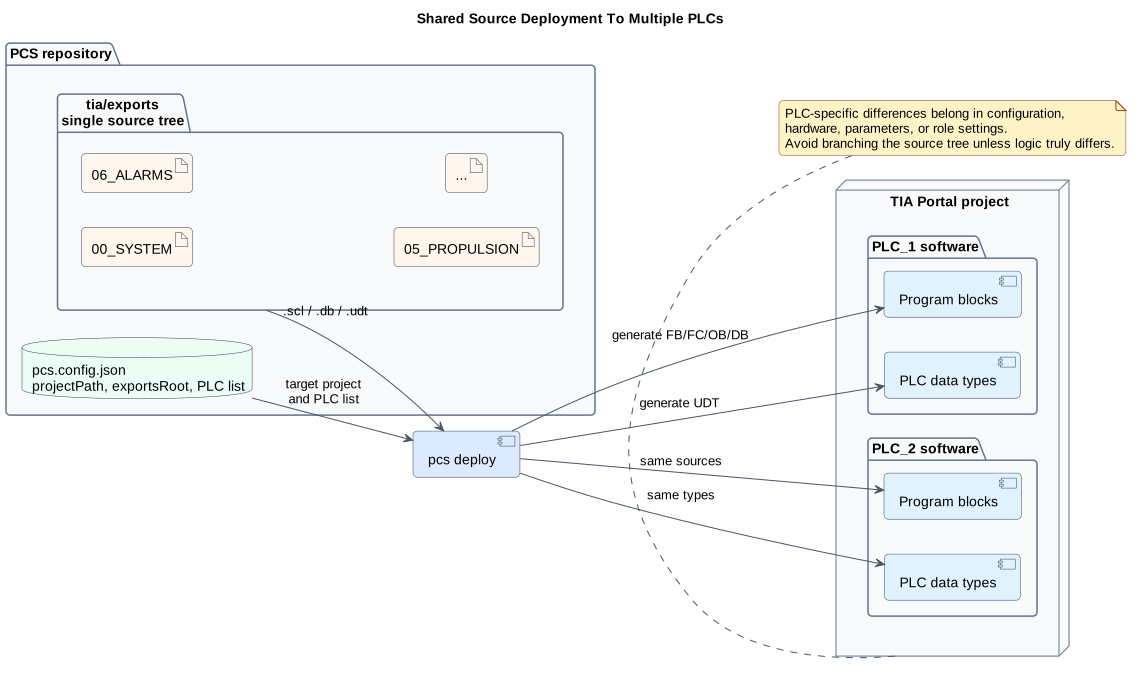
PlantUML-Source: multi-plc-deployment.puml