Multiple PLCs
For redundant or repeated PLCs, keep logic shared and make deployment multi-target.
Configuration
Configure PLC targets in pcs.config.json:
{
  "projectPath": "%USERPROFILE%\\Documents\\TIA-Projekte\\PCS\\PCS.ap20",
  "exportsRoot": "tia\\exports",
  "plcs": [
    "PLC_1",
    "PLC_2"
  ]
}
Deploy to all configured PLCs:
pcs deploy
Deploy to selected PLCs:
pcs deploy plcs=PLC_1
pcs deploy plcs=PLC_1,PLC_2 folder=06_ALARMS
See also: Terminal Commands (CLI) and TIA Deployment.
Shared Logic, Explicit Configuration
Keep FBs, FCs, shared DB structures, and UDTs identical across PLCs. Put PLC-specific differences into explicit configuration:
- hardware configuration in TIA Portal,
- per-PLC parameter DB initial values,
- HMI/runtime configuration,
- network partner names and addresses,
- role/index values such as primary/secondary or redundancy member number.
If the code must diverge between PLCs, prefer a parameter or configuration DB before creating separate source trees.
Multi-PLC Diagram
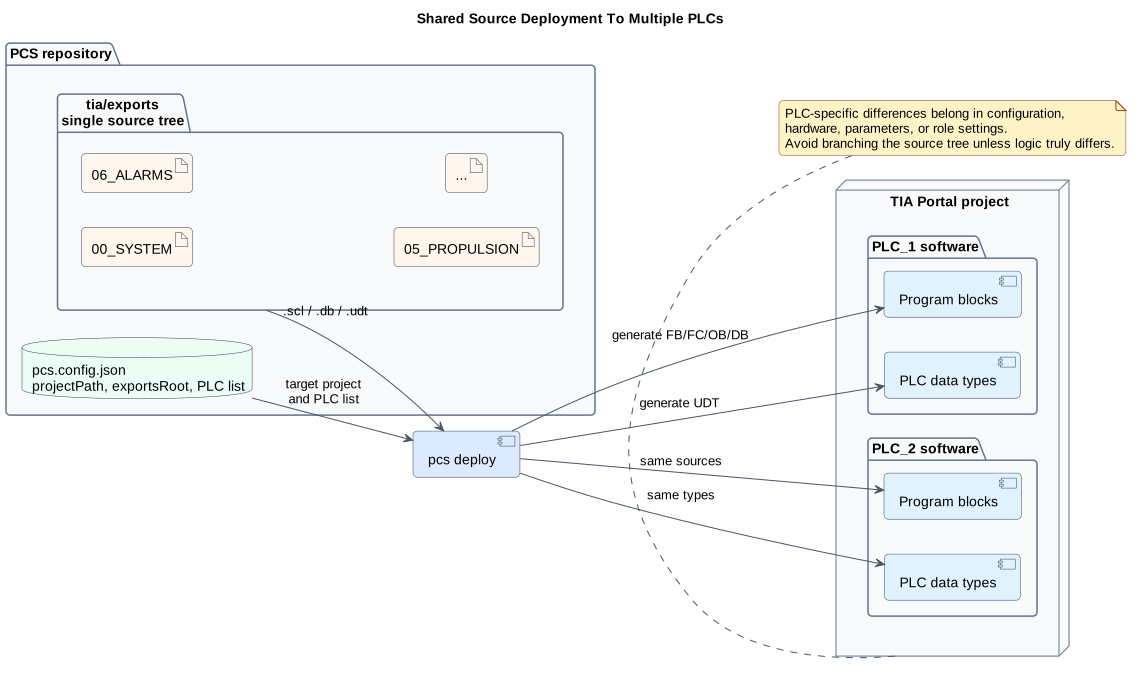
PlantUML source: multi-plc-deployment.puml