TIA / Repo Sync
The long-term workflow should let engineers keep TIA Portal as their familiar working environment while Git remains the source of truth for PCS source files.
The repository authority is:
tia/exports/**/*.scl
tia/exports/**/*.db
tia/exports/**/*.udt
TIA Portal is treated as the working copy. Engineers may edit and debug in TIA, but changes become team-visible only after the controlled export/check-in workflow writes them back to tia/exports and commits them.
Sync Model
The sync engine compares three states:
| State | Meaning |
|---|---|
| Base | Last known synchronized state between repository and TIA |
| Repo | Current source files below tia/exports |
| TIA | Current blocks exported from the open TIA project |
That produces clear decisions:
| Condition | Interpretation |
|---|---|
| Base equals TIA, Repo changed | Incoming repository change, safe candidate for import into TIA |
| Base equals Repo, TIA changed | Local TIA change, safe candidate for export into repository |
| Repo equals TIA | Clean |
| Base, Repo, and TIA all differ | Conflict, engineer must review manually |
The comparison is based on normalized file hashes, not timestamps. Newline differences are ignored so the result focuses on real source changes.
For SCL sources, normalization also ignores TIA Portal formatting that does not change the program meaning:
- optional
#prefixes on local variables, for example_uiCounterand#_uiCounter, - TIA-generated metadata lines such as
TITLE = ...andS7_Optimized_Access.
Quoted identifier casing is not ignored. A difference such as "UDT_DRIVELIMITS" vs. "UDT_DriveLimits" remains visible because it reflects coding style and source ownership.
For DB and UDT sources, comments are ignored because TIA source generation does not preserve them reliably.
Data Flow
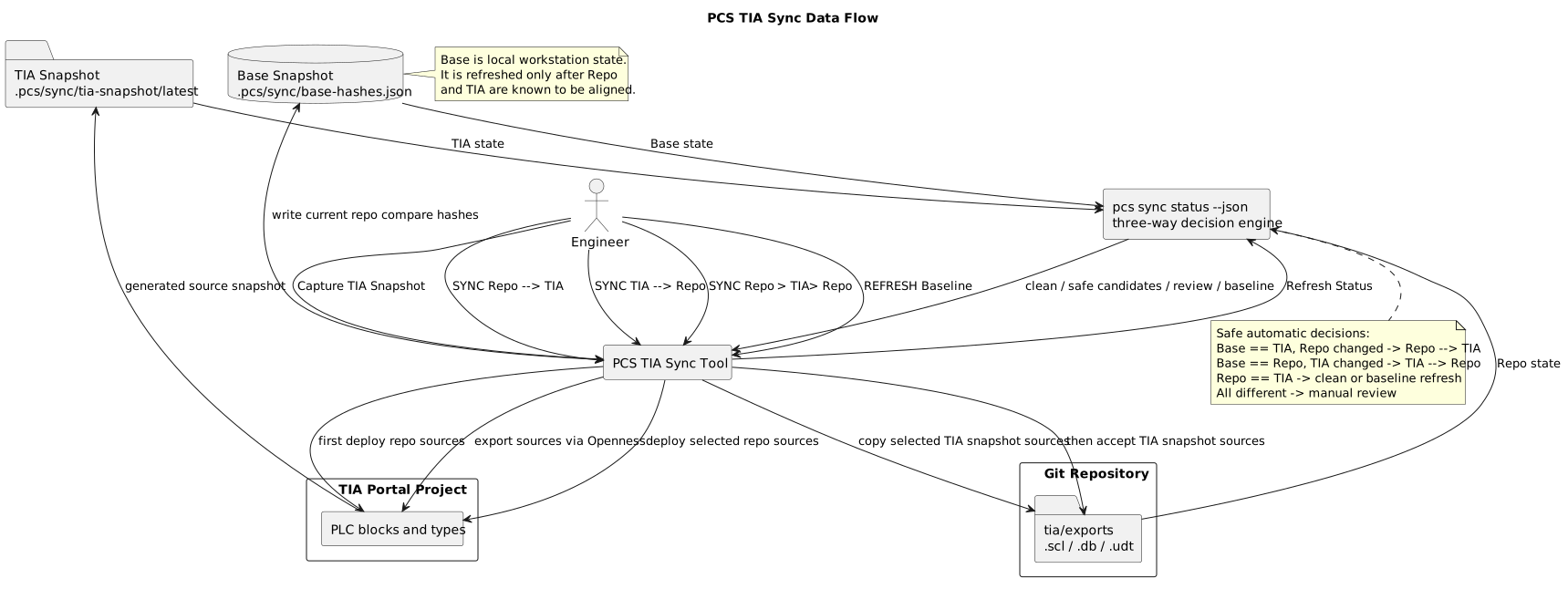
PlantUML source: tia-repo-sync-flow.puml
The overview diagram shows the persistent states. The simplified sequence diagrams below show the high-level handoff between Engineer, PCS GUI, PCS CLI, TIA Openness, TIA Portal, Repository, and Git.
Simplified Snapshot And Status Sequence
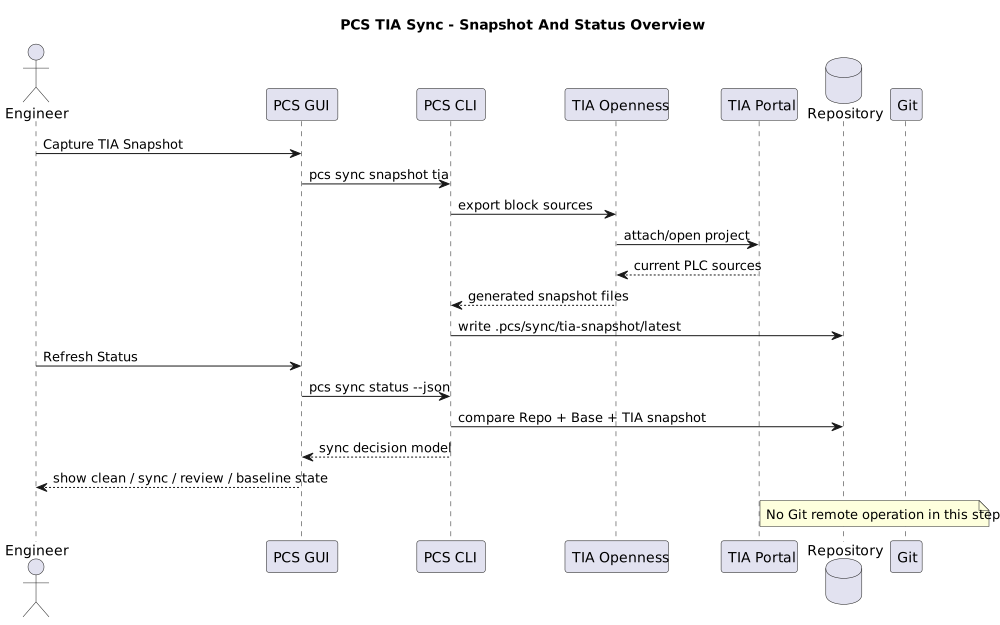
PlantUML source: tia-sync-simple-snapshot-status.puml
Simplified Repository To TIA Sequence
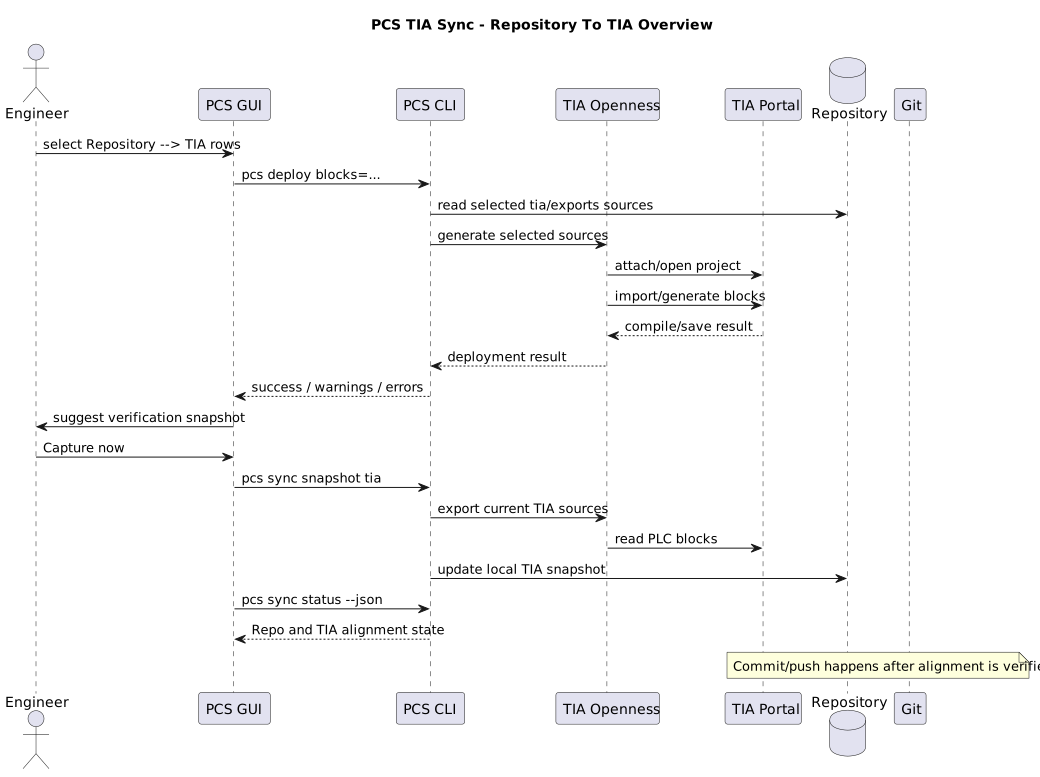
PlantUML source: tia-sync-simple-repo-to-tia.puml
Simplified TIA To Repository Sequence
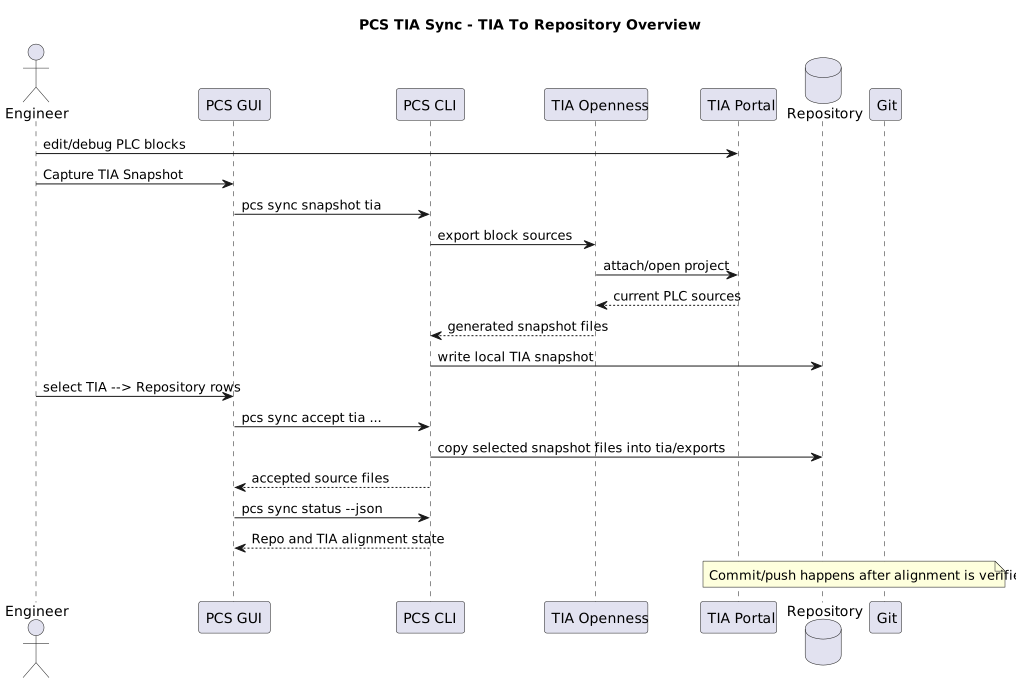
PlantUML source: tia-sync-simple-tia-to-repo.puml
Simplified Baseline And Git Publish Sequence
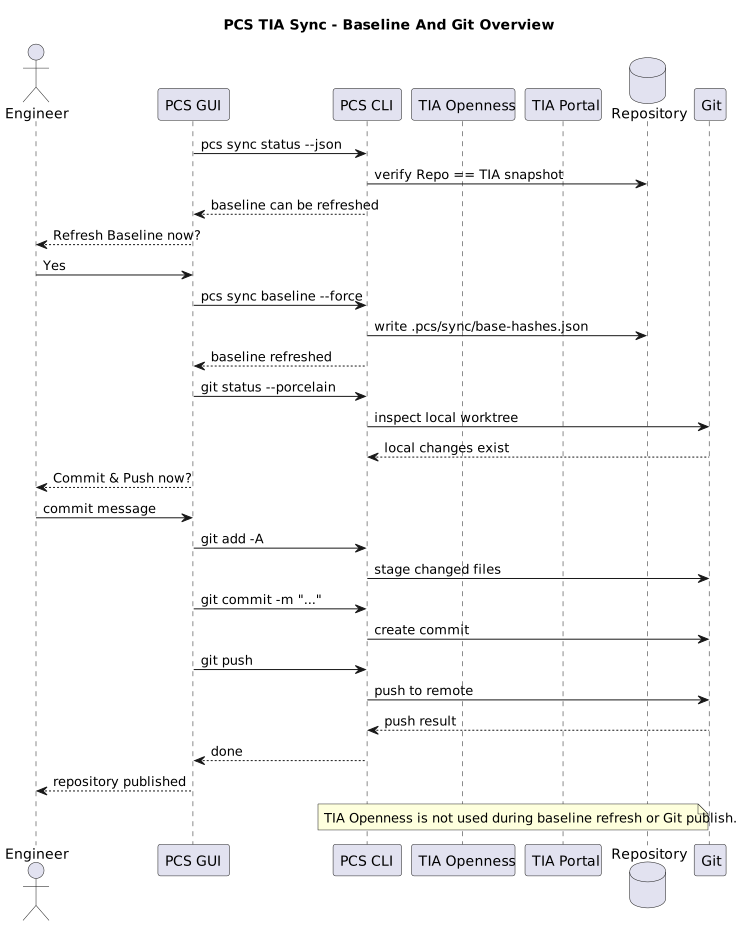
PlantUML source: tia-sync-simple-baseline-git.puml
The detailed sequence diagrams below show the command-level data flow for each main sync action.
Capture Snapshot And Refresh Status
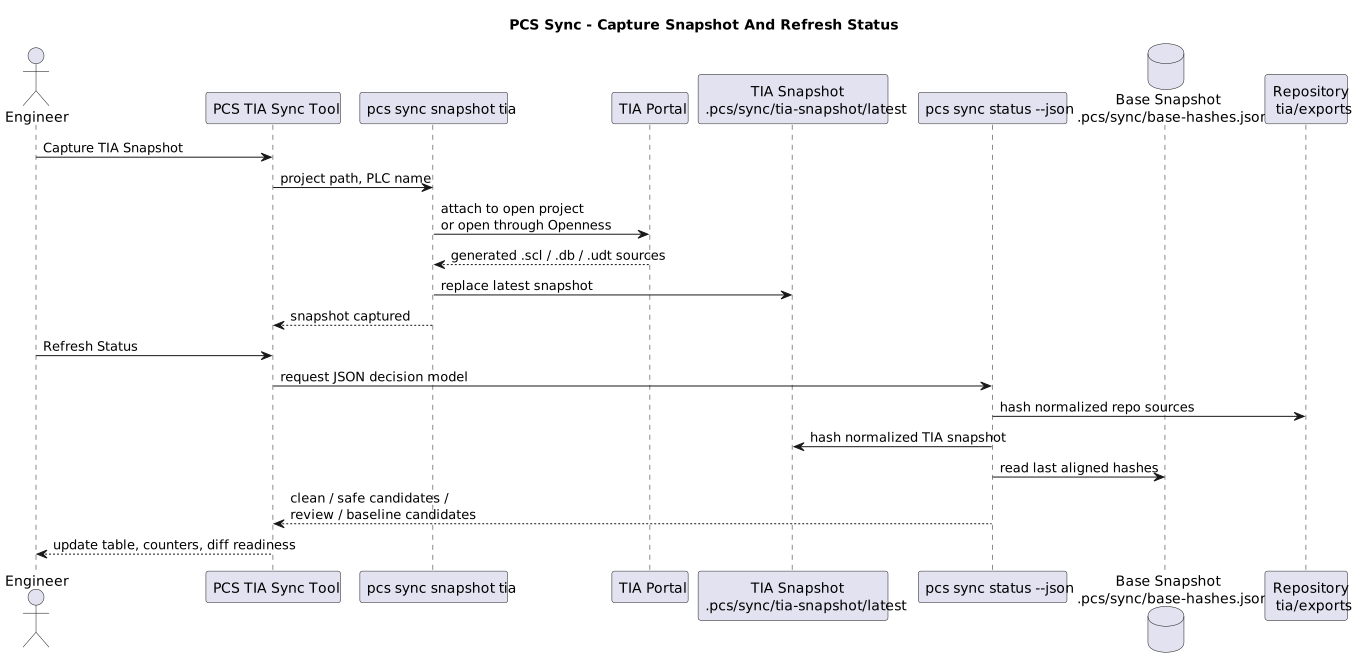
PlantUML source: tia-sync-capture-status.puml
TIA To Repository
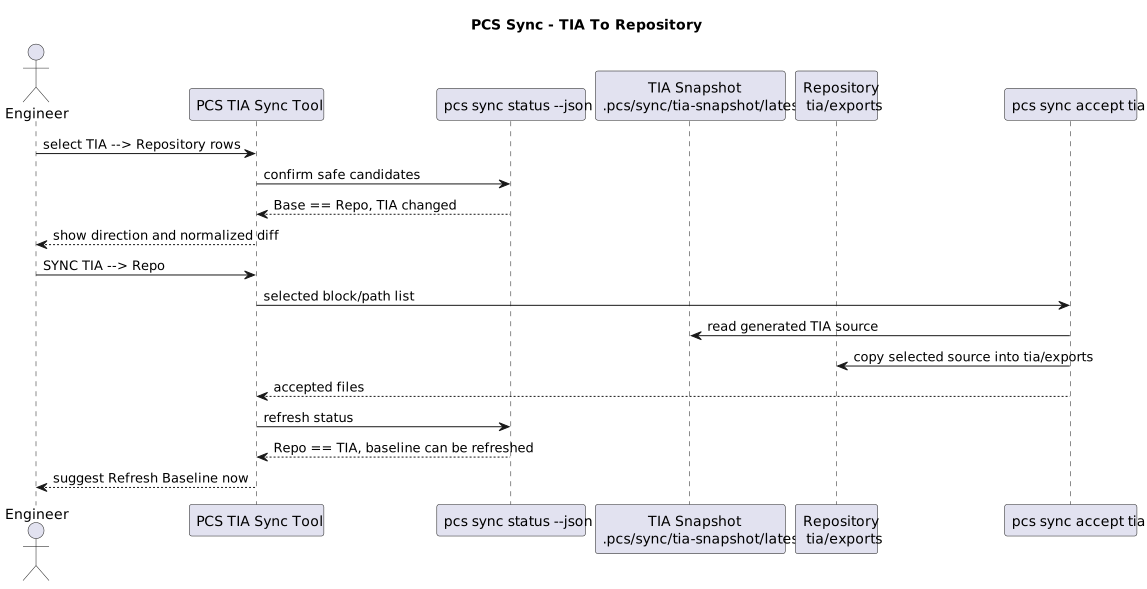
PlantUML source: tia-sync-tia-to-repo.puml
Repository To TIA
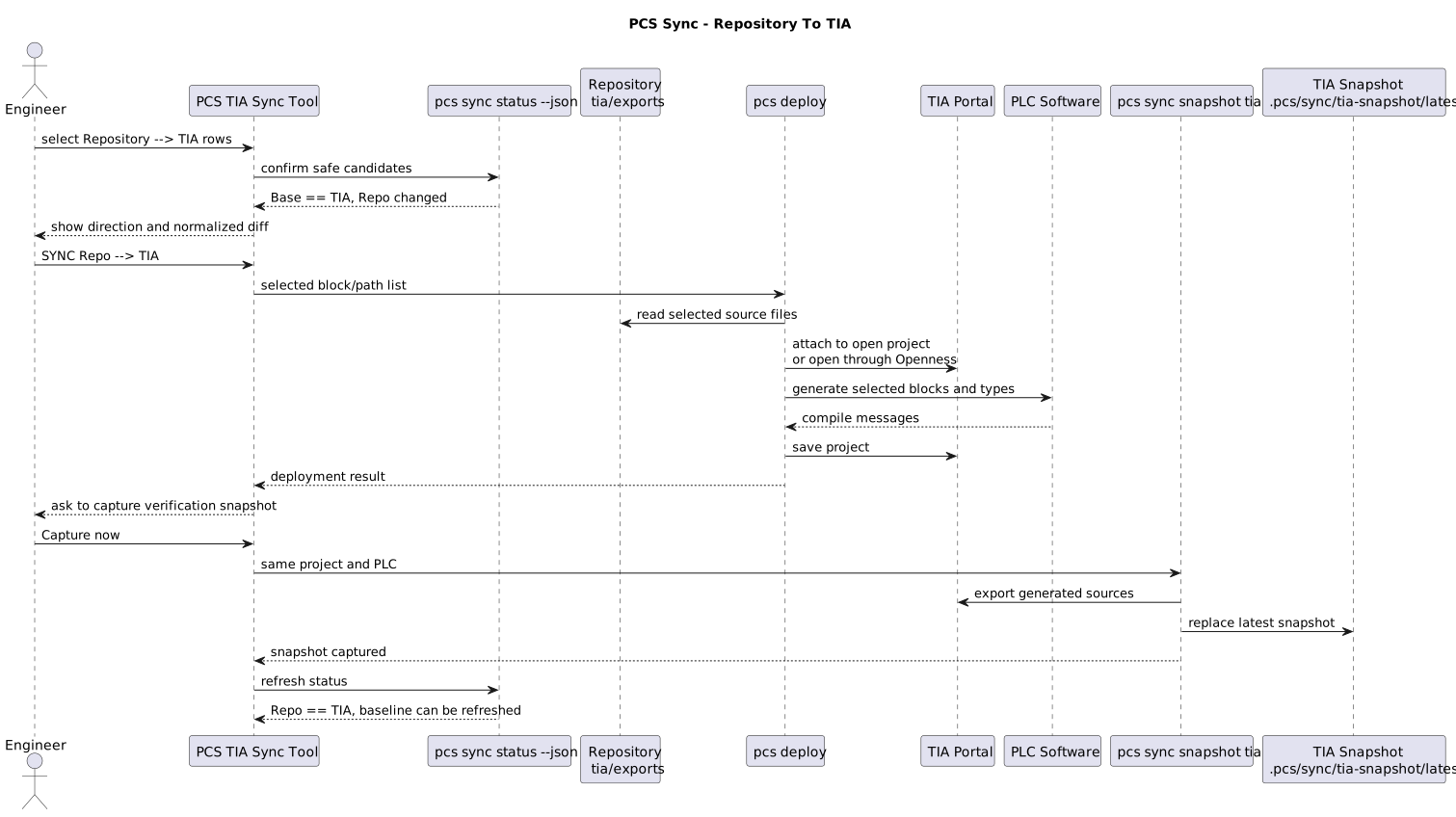
PlantUML source: tia-sync-repo-to-tia.puml
Refresh Baseline
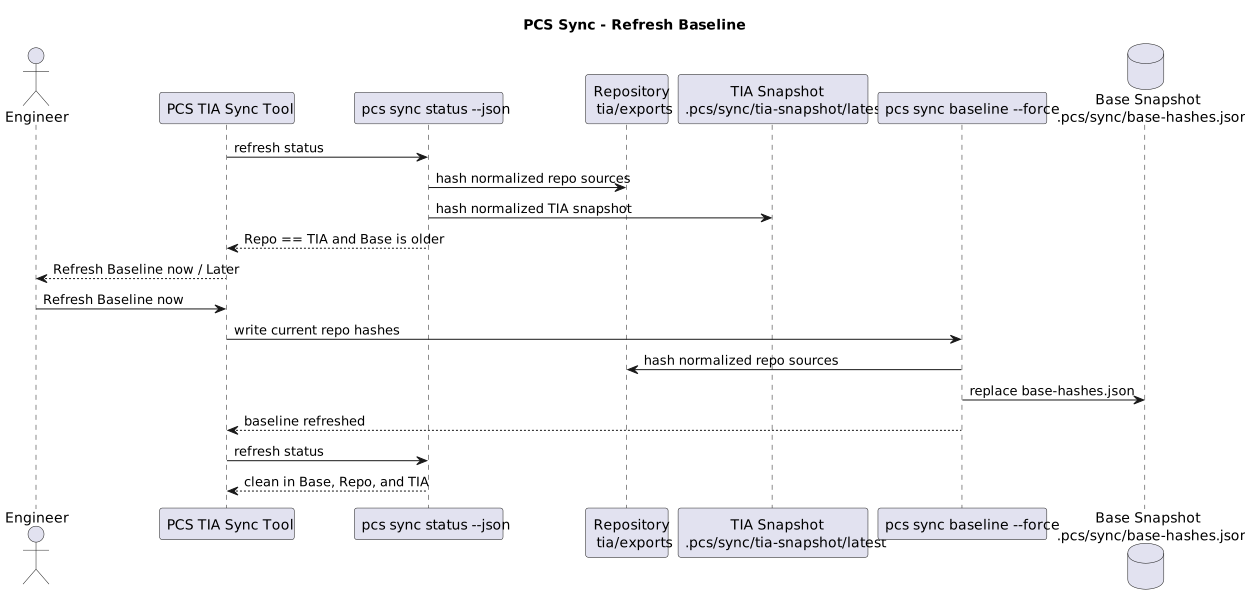
PlantUML source: tia-sync-baseline-refresh.puml
The sync workflow has three states:
| State | Stored in | Updated by |
|---|---|---|
| Repository | tia/exports |
VS Code edits, Git pulls, or SYNC TIA --> Repo |
| Base | .pcs/sync/base-hashes.json |
REFRESH Baseline |
| TIA | .pcs/sync/tia-snapshot/latest |
Capture TIA Snapshot |
The GUI buttons move data between these states:
| Button | Data flow | Result |
|---|---|---|
| Capture TIA Snapshot | TIA Portal -> TIA snapshot | Current TIA blocks are exported into local comparable source files |
| Refresh Status | Repository + Base + TIA snapshot -> decision table | The tool classifies clean blocks, safe sync candidates, baseline candidates, and manual-review items |
| SYNC Repo --> TIA | Repository -> TIA Portal | Selected repository sources are deployed into the selected PLC |
| SYNC TIA --> Repo | TIA snapshot -> Repository | Selected TIA snapshot sources are copied into tia/exports |
| SYNC Repo --> TIA --> Repo | Repository -> TIA Portal, then TIA snapshot -> Repository | Both selected directions are applied; repository-to-TIA runs first |
| REFRESH Baseline | Repository -> Base | Current repository compare hashes become the new local aligned state |
The baseline is not committed to Git. It is local workstation state and should be refreshed only after the engineer has verified that Repository and TIA are aligned.
TIA-facing sync actions prefer an already-open matching TIA Portal project. If the configured project is open, PCS attaches to that running TIA instance and avoids the slower startup path. If it is not open, PCS opens the project through Openness without the user interface.
Current Foundation
The first implementation step is repository-side snapshotting:
pcs sync hash repo
pcs sync baseline
pcs sync status
pcs sync status --json
pcs sync snapshot tia plc=PLC_1
pcs sync diff FB_AlarmRouting
pcs sync baseline writes the local baseline file below .pcs/sync. This folder is ignored by Git because it represents local workstation state, not project source.
Use the baseline only when the current TIA project and current repository sources are known to be aligned:
pcs deploy
pcs sync baseline
pcs sync status
If the baseline already exists and must intentionally be replaced:
pcs sync baseline --force
Capture the current TIA project state into a local source snapshot:
pcs sync snapshot tia plc=PLC_1
The snapshot is written below .pcs/sync/tia-snapshot/latest. It is local workstation state and is ignored by Git.
After a TIA snapshot exists, pcs sync status also compares repository sources against the TIA snapshot:
| Group | Meaning |
|---|---|
| Equivalent after source normalization | Same source after ignoring line endings, indentation noise, empty lines, and DB/UDT comments |
| Different between repo and TIA snapshot | Same path exists on both sides, but content differs |
| Only in repo | Source exists in Git but not in the TIA snapshot |
| Only in TIA snapshot | Source exists in TIA but is not represented in tia/exports |
pcs sync status also prints a three-way decision view across Base, Repo, and TIA. This is the view the GUI should use for safe workflow decisions:
| Group | Meaning |
|---|---|
| Repo changed only | Repository changed while TIA still matches Base; candidate Repo -> TIA |
| TIA changed only | TIA changed while repository still matches Base; candidate TIA -> Repo |
| Same change in repo and TIA | Repo and TIA agree but the baseline is old; candidate baseline refresh |
| Added in repo/TIA only | New source exists on only one side |
| Conflicts | Repo and TIA both changed differently or one side changed while the other deleted |
Use a focused diff for one block or relative path:
pcs sync diff FB_AlarmRouting
pcs sync diff 06_ALARMS/FB_AlarmRouting.scl
pcs sync diff FB_AlarmRouting raw
Accept safe TIA-only changes into tia/exports:
pcs sync accept tia FB_AlarmRouting --dry-run
pcs sync accept tia FB_AlarmRouting
pcs sync accept tia all --dry-run
pcs sync accept tia all
The accept command only copies files from decision groups that are safe TIA -> Repo candidates. Conflicts require manual review first.
Current GUI Workflow
The focused GUI for this workflow is the PCS TIA Sync Tool:
.\tools\pcs-tia-sync-tool\build.ps1
.\tools\pcs-tia-sync-tool\bin\pcs-tia-sync-tool.exe
It consumes pcs sync status --json, shows one decision table for both directions, and only enables actions that are safe for the current selection.
| GUI group | Source decision | Action |
|---|---|---|
| TIA changed | tiaChangedOnly, tiaAddedOnly |
Accept TIA snapshot source into tia/exports |
| Repo changed | repoChangedOnly, repoAddedOnly |
Deploy repository source into the selected PLC |
| Baseline | sameChangeInRepoAndTia, addedSameInRepoAndTia, deletedInBoth |
Refresh local baseline after verification |
| Review | conflicts, pathMismatches, one-sided deletions |
Manual review |
Normal GUI workflow:
- Capture a TIA snapshot.
- Review the summary tiles and change table.
- Select a row and open the Diff tab for changed sources.
- Choose the safe candidates with the Sync? checkboxes or the selection buttons.
- Click the purple SYNC button to run the checked jobs. Its label changes to the selected direction: SYNC Repo --> TIA, SYNC TIA --> Repo, or SYNC Repo --> TIA --> Repo. If both directions are selected, Repository -> TIA jobs run first, then TIA -> Repository jobs.
- Refresh the baseline when Repo and TIA are aligned.
The older deployment GUI remains available for deployment presets, simulation/test work, and broader engineering helpers, but daily source synchronization should use pcs-tia-sync-tool.exe.
Manual Review
Manual review means the three-way comparison cannot choose a safe direction automatically. The engineer should inspect the normalized diff first. If the normalized diff is empty, the difference is likely formatting or TIA source-generation noise and a baseline refresh may be sufficient after status is refreshed.
If a real decision is still needed, the GUI provides explicit override actions for the selected review row:
| Override | Use when |
|---|---|
SYNC Repo --> TIA |
The repository source is authoritative and should overwrite the TIA state |
SYNC TIA --> Repo |
The TIA snapshot source is authoritative and should be copied into tia/exports |
For formatting-only differences, prefer Use Repo --> TIA if an override is needed, because Git/repository sources remain the authority.
See also: PCS Engineering Tool.
Next Implementation Steps
- Add Git buttons for pull/rebase, commit, and push.
- Add conflict review and side-by-side visual diffs for same-block changes.
- Add a guided "capture again to verify" step after Repo -> TIA deployment.
- Add clearer commit preparation after accepting TIA -> Repo changes.