Web HMI Runtime
This note captures the emerging idea of a modern PCS HMI/runtime platform beside the Siemens PLC project. It is not a final architecture decision. It is a working vision for experiments, discussion, and learning.
The core idea is to keep the PLC deterministic and Siemens-standard, while moving visualization, documentation, alarm history, diagnostics, and operator/service tooling into a versioned web stack.
Git repository
  -> TIA SCL source
  -> HMI frontend
  -> backend / PLC gateway
  -> alarm model
  -> documentation
  -> release manifest

Industrial box PC
  -> serves HMI
  -> serves version-specific docs
  -> communicates with PLC
  -> stores alarm/event history

S7 PLC
  -> deterministic control
  -> interlocks and trips
  -> process status
  -> command and parameter interface
Motivation
Traditional TIA HMI engineering is familiar and integrated, but it can also feel limiting when compared with modern software development:
- UI design is often hard to make clean, responsive, and operator-friendly.
- Reuse across projects is limited by vendor-specific engineering workflows.
- Versioning HMI, PLC logic, documentation, and commissioning knowledge together is difficult.
- Modern engineering practices such as code review, static assets, automated builds, package manifests, and web-based documentation are not first-class in the classic HMI workflow.
The proposed direction is not "web because web is fashionable". The useful argument is:
Keep the reliable Siemens PLC core, but improve maintainability, versioning, documentation, serviceability, and operator experience around it.
Proposed Architecture
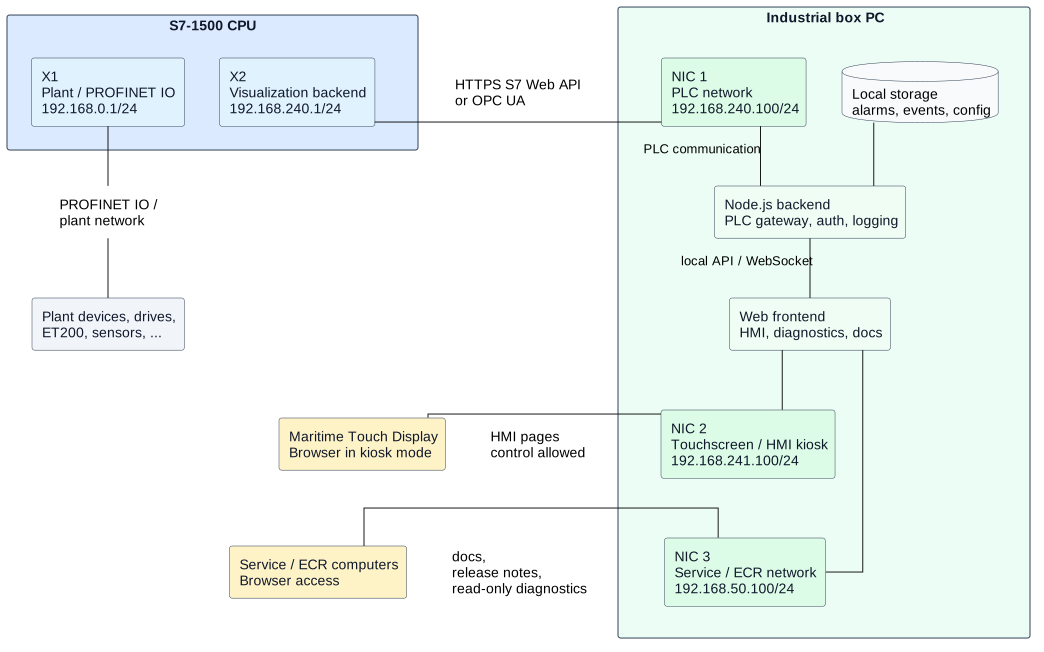
For a serious system, the browser should not talk directly to the PLC as the final architecture. A small backend on the industrial box PC should act as the PLC gateway.
Browser HMI
  -> HTTPS
Node.js backend / gateway on box PC
  -> S7 Web API, OPC UA, or another PLC protocol
S7 PLC
The backend provides a controlled boundary:
- manages PLC sessions and certificates,
- hides raw PLC addresses from the browser,
- exposes domain-oriented HMI APIs,
- validates operator writes,
- rate-limits and logs commands,
- stores alarm/event history,
- serves live updates through WebSockets or Server-Sent Events,
- serves the version-specific documentation site.
The browser frontend can then be built with a modern stack such as Vue and Tailwind, while the PLC remains responsible for real-time control behavior.
Hardware And Network Concept
A realistic development and later production shape is a multi-interface box PC between the PLC, local HMI touchscreen, and optional service or crew network.
Example hardware:
| Component | Development role | Production direction |
|---|---|---|
| S7-1500 CPU | Real PLC target for Web API / OPC UA tests | PCS controller with separated plant and visualization interfaces |
| Mini PC / box PC | Runs backend, frontend, docs, logs | Industrial PC with 24 VDC, watchdog, lifecycle, mounting, approvals as needed |
| Touch display | Browser in kiosk mode | Maritime/industrial touch panel with suitable brightness, dimming, IP rating, and approvals |
| Service/ECR PC | Reads docs and maybe read-only diagnostics | Restricted network access to documentation and service pages |
Example network layout:
PLC X1:
  Plant / PROFINET IO
  192.168.0.1/24

PLC X2:
  Visualization backend
  192.168.240.1/24

Box PC NIC 1:
  PLC network
  192.168.240.100/24

Box PC NIC 2:
  Local touchscreen / kiosk network
  192.168.241.100/24

Box PC NIC 3:
  Service / ECR / crew network
  192.168.50.100/24
The box PC should normally not act as an IP router between these networks. The PLC network should not become reachable from the service or crew network just because both cables are plugged into the same computer.
Instead, the backend republishes only the intended information:
- PLC communication is limited to the backend on the PLC-facing interface.
- The local touchscreen gets the full HMI experience.
- The service or crew network may get documentation, release notes, version information, and read-only diagnostics.
- Control actions remain restricted to the intended HMI network and authorized roles.
This gives useful access without accidentally creating a broad path into the PLC.
Access Separation
The runtime should combine network separation with application roles.
Example route exposure:
| Route | Touchscreen network | Service/ECR network |
|---|---|---|
/hmi |
allowed | blocked or read-only variant |
/alarms |
allowed | optional read-only |
/diagnostics |
allowed | optional read-only |
/docs |
allowed | allowed |
/release-notes |
allowed | allowed |
/admin |
engineer/admin only | engineer/admin only |
Example roles:
| Role | Intended permissions |
|---|---|
| Viewer | docs, version, release notes, read-only status |
| Operator | HMI screens, normal commands, alarm acknowledgement |
| Engineer | diagnostics, parameter pages, commissioning tools |
| Admin | users, configuration, updates |
For a local kiosk, the touchscreen can stay logged in as an operator role. For service or ECR PCs, users should log in with their own credentials and receive only the permissions they need.
Possible Runtime Layout
Box PC
  C:\PCS\
    app\
      backend\
      frontend\
      docs\
      config\
      logs\
      data\
        alarms.sqlite
    releases\
      PCS_1.2.0\
        manifest.json
        changelog.md
        plc\
        hmi\
        docs\
Possible local URLs:
https://pcs-hmi.local/
https://pcs-hmi.local/alarms
https://pcs-hmi.local/diagnostics
https://pcs-hmi.local/docs
https://pcs-hmi.local/version
The documentation can be built with MkDocs and served as static files by the same backend, by nginx, by Caddy, or by another small static web server.
PLC Data Interface
The PLC should expose intentional HMI interface DBs rather than allowing the HMI to read and write arbitrary internals.
Example:
DB_HMIStatus
  read-only status values for visualization

DB_HMICommands
  operator command requests
  command IDs
  acknowledgements
  rejection reasons

DB_HMIParameters
  editable parameters with validation in PLC logic

DB_AlarmActive
  active alarm states
  priorities
  acknowledgement states

DB_EventBuffer
  sequence-numbered event/alarm transitions
The HMI should send commands, not directly force internal behavior. The PLC validates each command and remains the authority for accepted control actions.
S7 Web API Role
The first successful experiment used the Siemens S7 Web API exposed by a simulated S7-1500 in PLCSIM Advanced.
The basic flow is:
- POST a JSON-RPC
Api.Loginrequest to the PLC. - Receive an authentication token.
- Send later requests with the
X-Auth-Tokenheader. - Read and write PLC variables through
PlcProgram.ReadandPlcProgram.Write.
Example endpoint:
https://192.168.240.1/api/jsonrpc
Example login request:
[
  {
    "jsonrpc": "2.0",
    "method": "Api.Login",
    "params": {
      "user": "Anonymous",
      "password": ""
    },
    "id": 1
  }
]
Example read request:
[
  {
    "jsonrpc": "2.0",
    "method": "PlcProgram.Read",
    "params": {
      "var": "\"DB_HMIStatus\".inCounter"
    },
    "id": 11
  }
]
The Web API is promising because it is HTTP/JSON-based and fits naturally with a Node.js backend. For production, OPC UA should still be compared seriously, especially for subscriptions, information modeling, certificate handling, and third-party integration.
Minimal Counter Prototype
A first proof-of-concept exists in the repository:
tools/s7-webapi-counter/
  index.html
  README.md
The page is intentionally simple and framework-free. It demonstrates the smallest useful loop:
Browser
  -> Api.Login
  -> PlcProgram.Read "DB_HMIStatus".inCounter
  -> PlcProgram.Write "DB_HMIStatus".inCounter
The UI has three core elements:
<button id="minus" type="button" disabled>-</button>
<output id="value">?</output>
<button id="plus" type="button" disabled>+</button>
When connected, the page:
- logs into the PLC as
Anonymous, - stores the returned token,
- reads
"DB_HMIStatus".inCounter, - writes
currentValue - 1when-is clicked, - writes
currentValue + 1when+is clicked, - periodically sends
Api.Pingto keep the session alive.
This is not a production HMI pattern. It is a useful proof that a browser can communicate with the simulated PLC through the S7 Web API.
Production should move the login, token handling, certificate validation, write validation, and reconnect logic into a backend service.
Cybersecurity And Reliability
The production design must assume maritime 24/7 operation and restricted operational networks.
Important principles:
- The PLC must remain safe if the HMI or box PC fails.
- The browser should connect to the box PC, not directly to the PLC.
- PLC write access should be limited to dedicated command and parameter interfaces.
- Anonymous access is acceptable only for isolated experiments.
- Production should use named users, least-privilege permissions, and managed certificates.
- The box PC should have a firewall and only expose required ports.
- PLC Web API access should be enabled only on the intended visualization/service interface.
- Certificate expiry, PLC time synchronization, and DNS/IP naming must be part of commissioning.
- The HMI must clearly show stale data, lost PLC connection, backend errors, and degraded mode.
Certificate handling needs special attention. A bad architecture would require every operator browser to manually trust every PLC certificate. A better architecture is:
Browser trusts box PC certificate.
Box PC backend trusts PLC certificate.
PLC certificate is managed through TIA Portal / project security settings.
This reduces operator-facing certificate problems and keeps PLC authentication details inside the service layer.
Alarm System Direction
The alarm system is the most sensitive part of this idea.
The PLC should remain the authority for active process alarms, interlocks, trips, and safety-relevant states. The box PC can improve presentation and history:
PLC
  -> active alarm state
  -> alarm ID
  -> priority
  -> acknowledgement state
  -> event sequence number
  -> optional timestamp

Backend
  -> polls or subscribes to alarm changes
  -> stores history
  -> handles filtering and sorting
  -> serves current alarm list
  -> exports reports
For reliable event capture, the PLC should provide an event buffer or sequence counter. The backend should not depend on a browser screen being open at the exact moment an alarm changes.
Research topics:
- PLC-generated event buffers.
- Timestamp source and clock synchronization.
- Acknowledgement handshake.
- Alarm shelving/suppression rules.
- First-up alarm logic.
- Historical storage format.
- How this maps to maritime/class/customer requirements.
Arguments For Internal Discussion
This idea should not be presented as rejecting Siemens. A stronger framing is:
- Siemens PLC remains the control authority.
- TIA Portal remains the engineering and compile environment.
- The web runtime improves the operator and service layer.
- Git becomes the source of truth for PLC code, HMI, docs, and releases.
Useful arguments:
| Audience | Argument |
|---|---|
| Operators | Cleaner screens, faster navigation, better touch ergonomics, better alarm overview. |
| Commissioning engineers | Version-specific docs, live diagnostics, signal overview, release notes on site. |
| Service engineers | Exact software version, local documentation, logs, alarm history, easier troubleshooting. |
| Engineering team | Reusable platform, code review, structured releases, less copy/paste engineering. |
| Management | Stronger PCS standard, less project-specific reinvention, better maintainability. |
Avoid selling it as "modern web is better than TIA HMI". Sell it as a controlled extension of the Siemens PLC system that improves lifecycle quality.
Roadmap
Milestone 1: Explore Interfaces
- Continue S7 Web API experiments with PLCSIM Advanced.
- Read and write selected HMI DB values.
- Test reconnect behavior and token expiry.
- Test real hardware when available.
- Compare OPC UA for the same values.
Milestone 2: Define HMI DB Contract
- Design
DB_HMIStatus. - Design
DB_HMICommands. - Design
DB_HMIParameters. - Design alarm status/event structures.
- Document allowed writes and command handshakes.
Milestone 3: Backend Prototype
- Build a small Node.js gateway.
- Move PLC login/token handling out of the browser.
- Expose a simple REST/WebSocket API to the frontend.
- Add connection state and reconnect logic.
- Add structured logging.
Milestone 4: Frontend Prototype
- Build a small Vue/Tailwind HMI prototype.
- Add a status overview screen.
- Add a command test screen.
- Add a basic alarm list.
- Add a diagnostics page showing backend, PLC, and release status.
Milestone 5: Documentation Runtime
- Build MkDocs during release.
- Serve the static docs from the box PC.
- Add a visible software version and release manifest.
- Link HMI screens to relevant documentation where useful.
Milestone 6: Commissioning Package
- Create a repeatable box PC deployment bundle.
- Include HMI, backend, docs, config, release manifest, and changelog.
- Define backup/restore for configuration and alarm history.
- Document update and rollback steps.
Milestone 7: Production Hardening
- Certificate strategy.
- User and role model.
- Network segmentation.
- Watchdog and service supervision.
- Offline/degraded UI states.
- Long-duration endurance test.
- Security review.
- Maritime/customer requirement review.
Research Checklist
Topics to investigate:
- S7 Web API method coverage and limits.
- S7 Web API performance with realistic HMI tag counts.
- Bulk reads/writes versus individual requests.
- Token lifetime and session limits.
- Certificate generation and trust chain management.
- PLC user permissions for read/write access.
- OPC UA subscriptions and data modeling.
- PLCSIM Advanced networking modes.
- Real S7-1500 CPU behavior compared with PLCSIM Advanced.
- Browser kiosk mode on the target maritime touch display.
- Box PC operating system and service supervision.
- Offline and degraded operation behavior.
- Alarm/event history persistence.
- Class/customer cybersecurity expectations.
- Backup, restore, and update workflow.
Open Questions
- Which protocol should be the primary PLC-to-backend interface: S7 Web API, OPC UA, or a combination?
- How many values can be read comfortably at the target update rate?
- How should HMI screens declare the tag groups they need?
- Where should alarm timestamps be generated?
- How should operator acknowledgements be represented in PLC logic?
- How should project-specific vessel configuration be stored and versioned?
- Should the HMI and PLC live in one repository or sibling repositories?
- What is the smallest useful demo for management and the broader team?
Resources
- Siemens S7-1500 Web API overview
- Siemens Web API security notes
- Siemens certificate management for the web server
- S7 Web API counter prototype in the repository:
tools/s7-webapi-counter/README.md