Library Release Workflow
The PCS repository should remain the engineering source of truth. TIA Portal is still essential, but mainly as the compiler, integration environment, and simulation or test runtime. The development workflow should therefore use Git, the pcs CLI, automated checks, generated documentation, and controlled release packages wherever possible.
Release Artifacts
A PCS release should contain both source-level and TIA-level artifacts.
| Artifact | Purpose |
|---|---|
| Git tag | Immutable reference to the released source state |
| Source archive | Traceability and review of the exact exported PLC sources |
| Documentation archive | System, integration, and release documentation |
| TIA global library | TIA-native delivery artifact for project teams |
| TIA library archive | Compressed library package for distribution |
| Release manifest | Machine-readable release metadata |
| Changelog | Human-readable summary of changes |
| Compatibility notes | Migration and update information for integrators |
For TIA Portal global libraries, the native library file uses the .al<version> extension, for example .al20 for TIA Portal V20. A compressed archived global library uses .zal<version>, for example .zal20.
releases/
  PCS_1.2.0/
    PCS_1.2.0.zal20
    PCS_1.2.0-source.zip
    PCS_1.2.0-docs.zip
    release-manifest.json
    changelog.md
    compatibility-notes.md
    checksums.txt
The TIA library is the project-team delivery format. The source archive and Git tag are the development and traceability format.
Types And Master Copies
TIA libraries provide two important reuse mechanisms:
| Mechanism | Recommended PCS Usage |
|---|---|
| Types | Released PCS software blocks, UDTs, faceplates, and other reusable versioned objects |
| Master copies | Project scaffolding, templates, example structures, default objects, or generated project skeletons |
Use types for released PCS product logic. Types can carry versions and are the right concept for managed library updates.
Use master copies for project creation and templates. They are useful when a project should be generated from a known structure, but they should not be treated as the main mechanism for updating released PCS software.
Protection Strategy
Released PCS libraries should eventually be delivered as write-protected library artifacts. Write protection protects the release package from accidental modification and helps keep integrator projects aligned with a known product baseline.
Know-how protection is a separate topic. It protects the block implementation itself, not only the library artifact. For PCS, this should be used selectively and later, not as a default rule. In early development and integration phases, the priority is transparency, troubleshooting, and fast learning.
Recommended direction:
| Object Type | Protection Direction |
|---|---|
| Released global library | Write-protected delivery artifact |
| Core/internal product logic | Candidate for later selective know-how protection |
| Public UDTs and interfaces | Prefer readable |
| Interface DBs and parameter structures | Prefer readable |
| Project templates/master copies | Usually readable |
The developer/reference project and engineering library should stay editable. Protection belongs at the release boundary, not in the daily source-deploy loop.
Developer Workflow
A normal development change should follow this path:
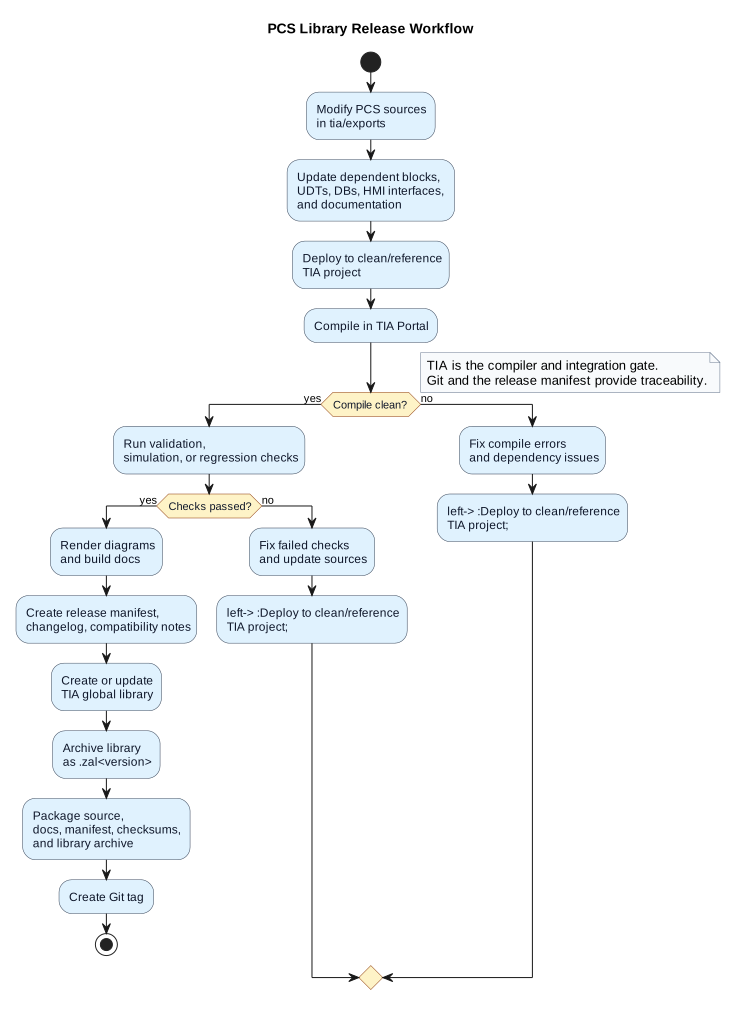
- Modify PLC sources in
tia/exports. - Update dependent blocks, UDTs, DBs, HMI interfaces, and documentation.
- Deploy to a clean or reference TIA project.
- Compile in TIA.
- Run simulation, validation, or regression checks.
- Render diagrams and build documentation.
- Create a release only if the reference project compiles and the checks pass.
pcs deploy dry-run
pcs deploy no-compile
pcs deploy
pcs docs render
pcs docs build
Later, this should become a controlled release command:
pcs release prepare version=1.2.0
pcs release validate
pcs release library
pcs release package
The current CLI already provides the prompt and packaging layer:
pcs release prepare version=1.2.0
pcs release validate
pcs release library version=1.2.0
pcs release package version=1.2.0
pcs release prepare detects changed PLC source files from Git, asks whether the release is breaking or migration-relevant, and creates:
releases/PCS_1.2.0/
  release-manifest.json
  changelog.md
  compatibility-notes.md
pcs release package creates source and documentation archives and writes checksums.txt.
pcs release library is currently a guided prompt. It does not yet create or update the TIA global library automatically. The actual TIA library creation still needs a verified Openness implementation against a real test library.
By default, pcs release prepare looks for the previous release tag matching pcs-library-v* and compares the new release against the newest lower version tag. For example, preparing version=1.2.0 will use pcs-library-v1.1.0 if that is the latest previous PCS library tag.
You can override the baseline explicitly:
pcs release prepare version=1.2.0 since=pcs-library-v1.0.0
Recommended release tags:
pcs-library-v0.1.0
pcs-library-v0.2.0
pcs-library-v1.0.0
Automation Potential
The long-term target is that normal PCS library release work can be driven from the PCS CLI or GUI, with TIA Portal used through Openness as the compiler and library backend.
Target developer-side automation:
pcs deploy
pcs release prepare version=1.2.0
pcs release validate version=1.2.0
pcs release library version=1.2.0
pcs release package version=1.2.0
Future pcs release library should:
- Open the clean/reference TIA project.
- Open or create the engineering global library.
- Create new versions of changed library types.
- Copy/update blocks and UDTs from the reference project into the library.
- Release/finalize the type versions.
- Create an archived
.zal<version>delivery library. - Optionally create a write-protected delivery variant.
- Update
release-manifest.jsonand checksums.
Manual TIA steps are acceptable during the learning phase, especially while the exact type-version and protection behavior is being tested. They should not be the permanent target workflow.
Dependency Handling
Block dependencies must be treated as part of the release, not as a manual afterthought. If a block interface changes, the release can affect more than the modified file.
Examples:
| Change | Possible Impact |
|---|---|
| FB input/output interface changed | Callers must be updated |
FB STAT structure changed |
Instance DB layout may change |
| UDT layout changed | DBs, block parameters, HMI tags, and interfaces may be affected |
| DB structure changed | HMI, alarms, trends, simulation, and external interfaces may be affected |
| Symbol renamed | Callers, HMI tags, traces, alarms, and documentation may need updates |
Compilation is the first hard gate. A release must not be created from a project that does not compile.
Compilation alone is not enough. The release process should also record dependency and migration information so that integrators can understand the update risk.
FB_PMS changed
  depends on:
    UDT_PMSCommand
    UDT_PMSStatus
  used by:
    FB_PowerManagementCoordinator
    OB30_POWER_MANAGEMENT_20MS
  affects instance DBs:
    DB_PMS
Instance DBs
Instance DBs are migration-sensitive. If an FB interface or STAT layout changes, TIA can often update the instance DB during compilation, but that is still an integration event.
The release notes should flag changes that affect:
- instance DB layout,
- start values,
- retain behavior,
- project-specific parameters,
- HMI bindings,
- online values,
- external interfaces.
Rule of thumb:
| Change Type | Release Risk |
|---|---|
| Internal logic only | Usually patch-level |
| Interface change | Migration-relevant |
STAT layout change |
Migration-relevant |
| UDT layout change | Migration-relevant |
| DB or symbol rename | High integration risk |
Future pcs release
The future pcs release command should produce a reproducible package. It should not simply archive whatever happens to be open in TIA.
Expected responsibilities:
- Verify clean repository state or explicitly record local changes.
- Validate
pcs.config.json. - Build the TIA Openness tooling.
- Deploy sources into a clean reference project.
- Compile.
- Run validation checks.
- Build documentation.
- Create or update the TIA global library.
- Archive the global library as
.zal<version>. - Generate release manifest, changelog, compatibility notes, and checksums.
Example manifest:
{
  "product": "PCS",
  "version": "1.2.0",
  "tiaVersion": "V20",
  "gitCommit": "abc123",
  "libraryArchive": "PCS_1.2.0.zal20",
  "changedBlocks": [
    "FB_PMS",
    "UDT_PMSStatus"
  ],
  "breakingChanges": true,
  "requiresProjectMigration": true
}
Design Principle
The released PCS library should behave like a product dependency. The repository produces the dependency, TIA compiles and validates it, and project teams consume it through a controlled update workflow.
This keeps PCS development close to modern software engineering while respecting that the final executable target is still a TIA Portal project.
Revision Tables
The block headers contain a revision table. This can be partly automated, but it should not become a blind bulk-edit step.
Git can identify which PLC source files changed:
git status --short -- tia/exports
That makes it possible for a future command to propose revision-table updates for only changed blocks:
pcs revision preview
pcs revision update version=1.2.0 comment="Updated PMS interface"
Recommended rule:
- let Git detect the affected files,
- let the engineer write the engineering comment,
- let the tool update formatting consistently,
- review the diff before release.
The comment is engineering intent and should remain human-authored. The tool can help with consistency, but it should not invent release comments from the diff.
References
- Siemens TIA Portal documentation: global libraries use
.al<version>files, for example.al20. - Siemens TIA Portal documentation: archived compressed global libraries use
.zal<version>files, for example.zal20.