Library Update Guide
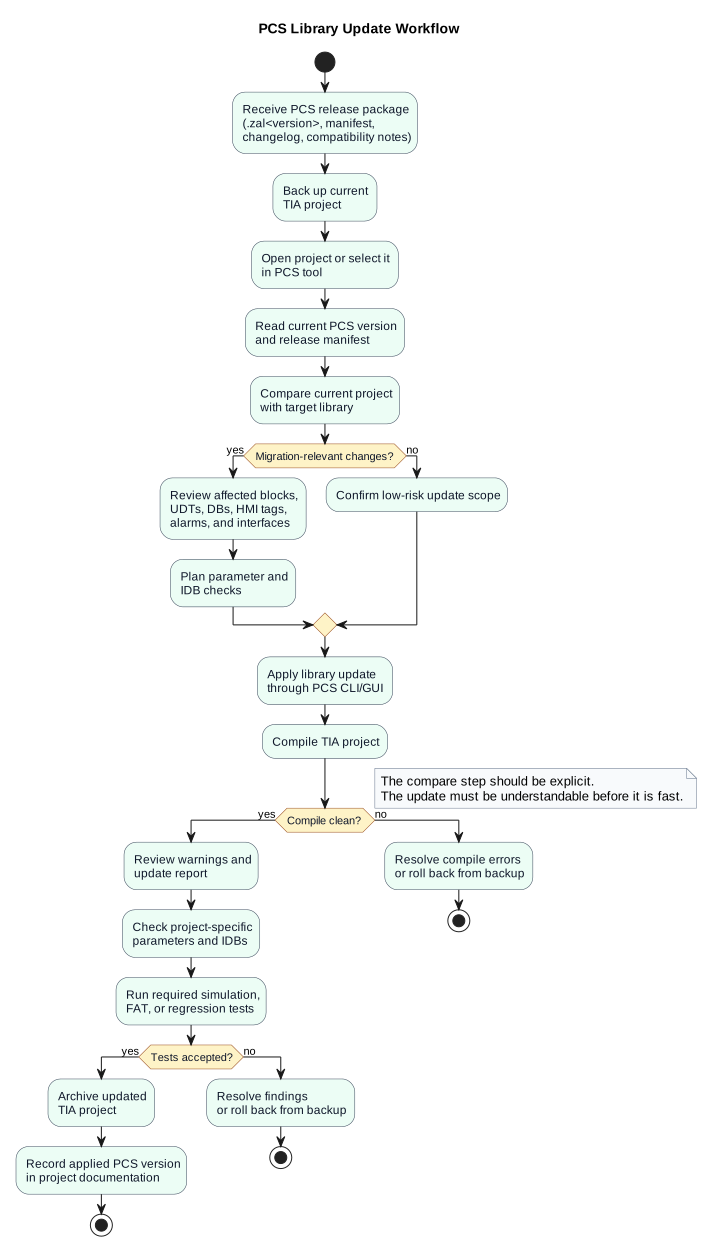
This page describes the intended future workflow for project engineers who apply a released PCS library update to a ship project.
The goal is to avoid manual, uncontrolled library dragging inside TIA Portal. The update should be performed through the PCS CLI or GUI, with a clear preview, compile result, and migration report.
Inputs
A project engineer should receive a versioned PCS release package:
PCS_1.2.0/
  PCS_1.2.0.zal20
  release-manifest.json
  changelog.md
  compatibility-notes.md
  checksums.txt
The .zal20 file is the compressed TIA global library archive for TIA Portal V20. The manifest and compatibility notes explain what changed and whether the update is migration-relevant.
Update Principles
- Always create a project backup before applying a library update.
- Review the release notes before updating.
- Compare the current project state with the target library version.
- Apply the update through the PCS tool when available.
- Compile after the update.
- Review affected instance DBs, parameters, HMI bindings, alarms, and interfaces.
- Run the required simulation, FAT, or commissioning checks before releasing the updated project.
Released libraries should eventually be write-protected. This protects the delivered baseline from accidental modification. Know-how protection is different and should only be used selectively where hiding implementation details is truly required. Public interfaces, UDTs, parameter structures, and integration-facing contracts should normally stay readable.
Intended CLI Workflow
The exact commands are future work, but the target workflow should look like this:
pcs library status
pcs library compare path=PCS_1.2.0.zal20
pcs library update path=PCS_1.2.0.zal20
pcs deploy
The compare step should run before any modification is made. The current CLI provides manifest-based inspection, compare, and guided update prompts:
pcs library inspect path=releases/PCS_1.2.0
pcs library compare path=releases/PCS_1.2.0
pcs library update path=releases/PCS_1.2.0
pcs library update does not yet execute automated TIA type synchronization. It prints the controlled update checklist and uses release-manifest.json to show the target version, changed sources, and migration flags.
The long-term goal is that the normal integrator update path is driven by PCS CLI or GUI:
- Open the customer TIA project.
- Open the released global library archive.
- Compare available type versions with the project state.
- Mark affected types for update.
- Apply the update.
- Compile.
- Generate an update and migration report.
Some manual review may remain necessary for interface changes, IDB migration, HMI tags, parameters, and commissioning-specific project details.
Example compare output:
Current PCS version: 1.1.0
Target PCS version: 1.2.0

Will update:
- FB_PMS 1.1.0 -> 1.2.0
- UDT_PMSStatus 1.1.0 -> 1.2.0

Migration-relevant:
- DB_PMS instance layout may change
- HMI references to DB_PMS should be reviewed
- PMS project parameters should be checked after compile
Intended GUI Workflow
The PCS GUI should eventually provide an Update PCS Library workflow:
- Select release package.
- Select or confirm TIA project.
- Read the release manifest.
- Compare current project version with target version.
- Show affected blocks, UDTs, DBs, HMI objects, and migration warnings.
- Apply the update.
- Compile.
- Save an update report.
The GUI should make the update understandable before it makes it fast.
Instance DB Review
Instance DBs require special attention. If an FB interface or internal STAT layout changed, the related instance DB can change during update and compilation.
Review:
- start values,
- retained values,
- project-specific parameters,
- HMI tag connections,
- alarm references,
- trend and logging references,
- external interface mappings.
If a release notes an IDB migration, treat the update as an engineering change, not as a simple library refresh.
After The Update
After applying the update:
- Compile the project.
- Resolve compile errors.
- Review warnings.
- Check project-specific parameters.
- Run simulation or regression tests.
- Generate or update project documentation.
- Archive the updated TIA project.
- Record the applied PCS version in the project documentation.
Release Acceptance
A project should only accept the updated PCS library when:
- the TIA project compiles,
- migration notes have been reviewed,
- affected parameters have been checked,
- required tests have passed,
- the update report is stored with the project documentation.
Current Status
This workflow is the intended direction. The current repository already provides the foundation through:
pcs.config.json,pcs deploy,pcs docs render,pcs docs build,- the TIA Openness deployment tooling,
- the future PCS GUI and CLI extension points.
Manifest-based library inspection, comparison, and guided update prompts are already available. Automated TIA type synchronization and protected-library handling are future milestones.